
Workstations
Workstations - Smart and Flexible Furniture for Modern Offices
No products found.
Office Workstations for Modern Workspaces
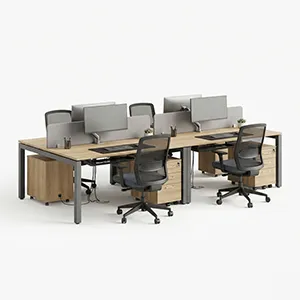
Office workstations combine desks, partitions, storage, and supporting components into an organised working area. They are commonly used in corporate offices, startups, call centres, educational institutions, shared offices, and home-work environments. A well-planned workstation can provide each employee with a defined space for computers, documents, and daily tasks. Modular systems can also be reconfigured when office requirements change.
A modular office workstation can include individual desks, connected worktops, privacy screens, cable trays, pedestals, and storage units. This makes it possible to create single-user, two-person, or larger team layouts.
Features and Materials
Modern workstations may include cable-management systems, modesty panels, privacy screens, drawers, shelves, CPU holders, monitor mounts, and adjustable components. Cable management helps keep power and data wires organised beneath or behind the work surface. Some office desk systems also offer height adjustment and integrated storage.
Common materials include engineered wood, MDF, particle board, laminate, metal, glass, and wood veneer. Metal frames can provide structural support, while laminate worktops offer a practical surface for everyday office use. Privacy screens can create clearer boundaries between employees in open-plan offices.
Common Problems and Practical Solutions
Poor workstation planning can make an office feel crowded. Desk width and depth should match the equipment being used. Laptop-only work may require less space, while dual-monitor or document-heavy roles need a larger worktop. Indian workstation planning guides commonly discuss modules around 1,200–1,600 mm wide and 600–750 mm deep, but the right size depends on the actual floor plan and work requirements.
Cable clutter is another common problem. Choose workstations with cable trays, outlets, or concealed routing. Limited storage can also create clutter. Add drawers, pedestals, or nearby storage units where required. For changing teams, modular furniture can make future layout changes easier.
Pros and Cons
Pros:
Creates organised individual work areas.
Makes efficient use of office floor space.
Modular designs can be reconfigured.
Cable-management features reduce wire clutter.
Storage and privacy options can be added.
Cons:
Large workstation clusters need careful space planning.
Installation can take more time than a standalone desk.
Modular systems may cost more than basic tables.
Incorrect sizing can create circulation and workspace problems.
Brands and Buying Guide
Brands and office-furniture manufacturers such as Godrej Interio, IKEA, and other Indian furniture suppliers offer workstation systems in different configurations. Current ranges include single-sided workdesks, activity tables, modular systems, and height-adjustable workstation tables.
Before buying, measure the office floor area and consider employee count, desk dimensions, chair clearance, storage, power points, cable routes, privacy requirements, and future expansion. A full-size layout or sample setup can also help identify space problems before installation.
Who Should Choose Workstations?
Workstations are suitable for corporate offices, IT companies, startups, call centres, financial offices, educational institutions, coworking spaces, and other workplaces with multiple desk users. A workstation table for office is useful for computer-based work, administration, customer support, design, accounting, and other desk-based roles.
For flexible teams, modular workstations can support layout changes. For smaller offices, compact workstation modules can help use available space more efficiently.